
The free guide
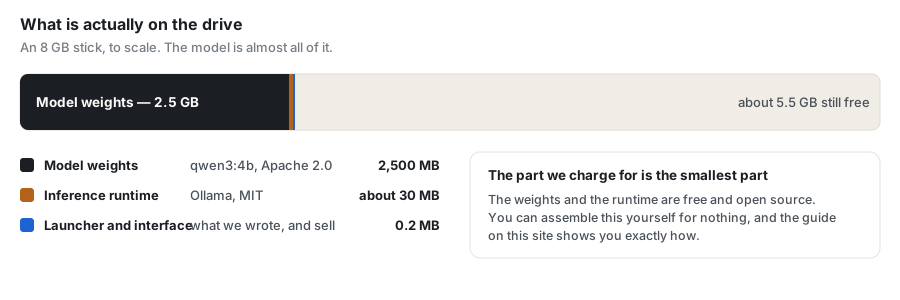
This is the whole method, given away. Everything below uses free, open-source software, and if you follow it you will have a working private AI on a USB drive without paying us anything. We sell the packaged version because most people would rather not do this — not because the information is secret.
What you need before you start
| Item | Minimum | Comfortable | Why it matters |
|---|---|---|---|
| USB drive | 8 GB, USB 3.0 | 32 GB, USB 3.2 or SSD | Read speed decides how long the model takes to load. Capacity is rarely the limit. |
| Host RAM | 8 GB | 16 GB | The model is loaded into the computer's RAM. This is the real constraint, not the drive. |
| Windows | 10 (64-bit) | 11 | The runtime below ships a 64-bit Windows build. |
| Free disk on host | none required | — | Everything can live on the drive if you point the runtime at it. |
Step 1 — Choose a model you are allowed to use
This step is skipped by almost every guide on the internet, and it is the one that matters most if you intend to do anything commercial. Open weights are not the same as an open licence. Some well-known models are published under terms that permit research and evaluation only.
| Model | Licence | Roughly | Commercial use |
|---|---|---|---|
| Qwen3 4B | Apache 2.0 | 2.5 GB | Yes, with attribution |
| Phi-4 mini | MIT | 2.5 GB | Yes, with attribution |
| SmolLM2 135M | Apache 2.0 | 0.27 GB | Yes, with attribution |
| Qwen2.5 3B | Qwen Research Licence | 1.9 GB | No — non-commercial only |
| Llama 3.2 3B | Llama Community Licence | 2.0 GB | Conditional — notice and naming rules apply |
| Gemma 3 1B | Gemma Terms of Use | 0.82 GB | Conditional — restrictions pass downstream |
For personal use any of these is fine. If you are building something you intend to sell, stay in the top three. Read the licence yourself before you rely on this table — you can print the exact terms your copy shipped with:
ollama show qwen3:4b --license
Step 2 — Put the runtime on the drive
You need something that can load a model file and answer prompts. Ollama is the simplest on Windows and is MIT-licensed. Install it normally first — you are going to point it at the drive afterwards.
- Install Ollama from its official site and let it finish.
- Make a folder on the USB drive, for example
D:\ai\models. - Tell the runtime to keep model files there by setting
OLLAMA_MODELSto that folder before you launch it. This is the whole trick: the runtime reads from the drive instead of from your user profile. - Pull the model with
ollama pull qwen3:4b. It downloads once, onto the drive.
Step 3 — Prove it is actually offline
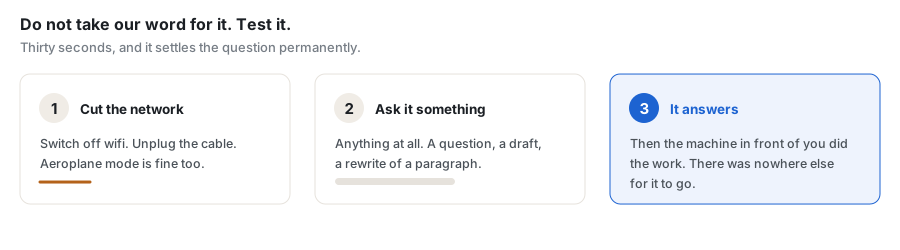
Do not take anyone's word for this, including ours. Turn off wifi, unplug the network cable, and ask it a question. If it answers, the computer in front of you did the work. If it fails, something in your setup is still reaching for a server.
A second check worth doing: watch the network while it answers. A local model generates no outbound traffic during inference.
Step 4 — Make it start from the drive
Write a small batch file on the drive that sets OLLAMA_MODELS,
starts the runtime, and opens whatever interface you want to use. Double-clicking
that file is your launcher.
What you will notice
- The first answer is slow. The model is being read off the drive into RAM. On a USB 3.0 stick expect tens of seconds. Later answers in the same session are far quicker because the model is already resident.
- It is not a frontier model. A 4-billion-parameter model that fits on a keyring will not match a hosted system running on datacentre GPUs. It is genuinely useful for drafting, summarising, explaining and rewriting.
- Cheap drives are the usual disappointment. A slow USB 2.0 stick can triple your load time. This is the single upgrade that helps most.
So what are we selling?
The steps above, done for you and tested: a launcher that finds the runtime whether or not it is installed, hardware detection so it picks a model your machine can actually hold, a real interface instead of a terminal, the licence paperwork already sorted, and a year of updates. $9.99 once, then $9.99 a year if you want to keep getting updates. If you would rather spend an afternoon than ten dollars, everything you need is on this page and we are glad to have helped.